
SMS / Text Message Program Terms
SMS / Text Message Program Terms
Last updated: May 27, 2026
This page describes the FN2 SMS / text message program in full. It supplements section 9 (SMS / Text Message Program) of the FN2 Terms of Service and Privacy Policy. Use of SMS is entirely optional. You can use every feature of FN2 without ever providing a phone number or receiving a text message. Consent to receive SMS is never a condition of purchase, signup, or continued use of the Service.
1. Program Operator
2. Program Description
FN2 sends SMS / text messages to users who have explicitly opted in. Messages fall into two categories:
- Transactional (account security): one-time phone-verification codes, account-security alerts, and billing notices. These are only sent in direct response to an action you take in the app (e.g. you add a phone number and request a verification code, or you change your password).
- Account / agent notifications: alerts triggered by your own configured agent runs, watchlists, and price thresholds. These are only sent after you explicitly opt in via the Integrations panel checkbox described in Section 3.
FN2 does not send promotional, marketing, or affiliate-marketing SMS messages on this program. FN2 does not share phone numbers with third parties or affiliates for marketing purposes; mobile information is shared only with subcontracted service providers (e.g. Twilio) strictly to support delivery of the messages you have opted in to receive.
3. How to Opt In
Opt-in to the FN2 SMS program is a multi-step, affirmative action that is separate from account signup and acceptance of the Terms of Service. Accepting the FN2 Terms of Service does not enroll you in SMS. The steps are:
- Sign in to your FN2 account and navigate to Preferences → Integrations.
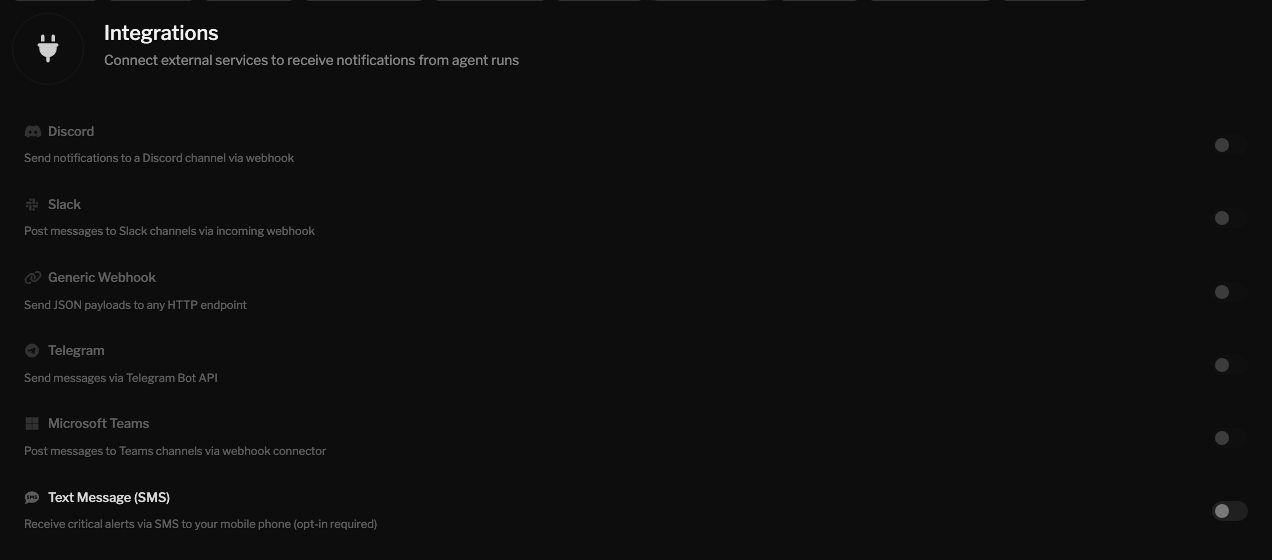
- Toggle "Text Message (SMS)" on. This expands the SMS configuration form. Toggling the row does not register consent or send any marketing message. It only reveals the form.
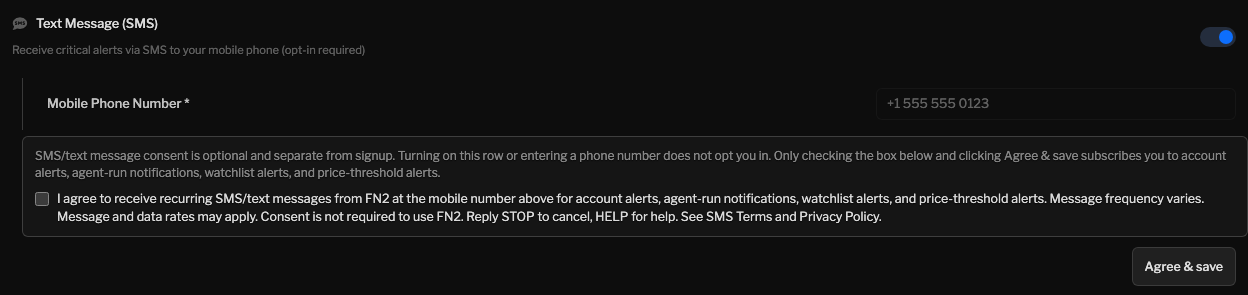
- Enter your mobile phone number and request a one-time verification code. The verification code is the only transactional message FN2 will send at this stage; it is sent solely so you can confirm ownership of the number. Entering and verifying a phone number is not opt-in to account/agent notifications.
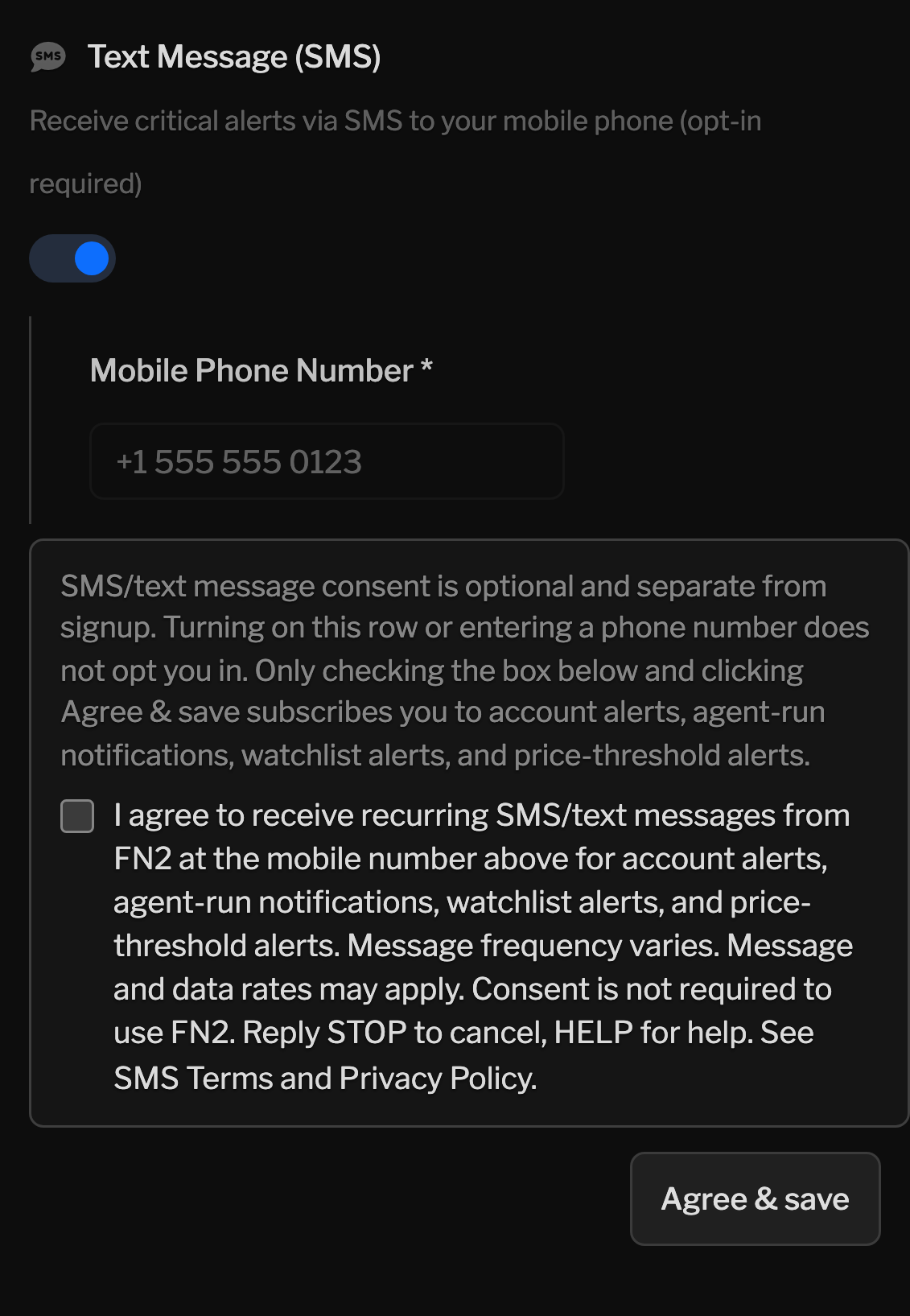
- Tick the dedicated, unchecked-by-default opt-in checkbox labeled "I agree to receive recurring SMS/text messages from FN2 at the mobile number above for account alerts, agent-run notifications, watchlist alerts, and price-threshold alerts. Message frequency varies. Message and data rates may apply. Consent is not required to use FN2. Reply STOP to cancel, HELP for help. See /terms/sms and Privacy Policy." The checkbox starts unchecked on every visit and must be ticked deliberately by you.
- Click "Agree & save." Your opt-in is recorded with a
timestamp in the FN2 audit log (table
sms_consent_events). No SMS notification messages are sent before this point.
The opt-in checkbox is not pre-checked. The Terms of Service acceptance during signup does not act as opt-in. Adding a phone number does not act as opt-in. Only the deliberate ticking of the dedicated SMS opt-in checkbox in the Integrations panel constitutes consent to receive account / agent notification messages.
3.1 Opt-In Workflow Proof
The screenshots below show the FN2 Integrations panel before SMS notification consent is recorded. The phone number field appears above the disclosure; the checkbox is unchecked by default; and the user must deliberately check that box and click Agree & save before receiving account alerts, agent-run notifications, watchlist alerts, or price-threshold alerts by SMS/text message.

4. Message Frequency
Message frequency varies based on your account activity and the alerts you configure. Typical volume is fewer than 5 messages per week for an active user. Heavy users with many configured agents may receive more. You can pause or stop messages at any time using any of the opt-out methods in Section 6.
5. Cost
FN2 does not charge for SMS. Message and data rates may apply from your wireless carrier. Carriers are not liable for delayed or undelivered messages.
6. How to Opt Out
You can stop receiving FN2 SMS messages at any time. Any of the following will immediately suppress all further notification SMS on this program:
- Reply to any FN2 SMS with one of the standard stop keywords: STOP, STOPALL, UNSUBSCRIBE, CANCEL, END, or QUIT. You will receive a single confirmation reply and no further messages will be sent unless you opt in again.
- Sign in to FN2, go to Preferences → Integrations, and either toggle "Text Message (SMS)" off or click "Opt out & delete" on the SMS card.
- Email support@fn2.ai with the subject "SMS opt-out" from the email address on your account (or include the phone number you wish to unsubscribe).
7. Getting Help
Reply HELP to any FN2 SMS for a short help reply with contact details and a link back to this page. You can also email support@fn2.ai or call (888) 295-4027.
8. Supported Carriers
The FN2 SMS program is supported on all major US wireless carriers, including AT&T, Verizon, T-Mobile, US Cellular, and most regional and MVNO carriers. Carriers are not liable for delayed or undelivered messages.
9. Privacy
Phone numbers and SMS metadata are stored and processed as described in the FN2 Privacy Policy. Mobile information you provide to FN2 will not be shared with third parties or affiliates for marketing or promotional purposes. Information sharing is limited to subcontracted service providers (such as Twilio) that support delivery of the messaging program. Opt-in audit records are retained for at least four years to comply with TCPA and CTIA requirements; SMS message-content logs are retained no longer than 90 days except where required by law.
10. Sample Messages
Examples of the kinds of messages you may receive after opt-in. Every notification message ends with a STOP footer.
Verification (transactional, sent on request only):
Agent completion alert (opt-in required):
Price alert (opt-in required):
Billing notice (transactional):
11. Changes
FN2 may update these SMS program terms from time to time. Material changes affecting opt-in, frequency, or content will be reflected on this page and, where appropriate, communicated in-app before they take effect.
12. Contact
Questions about the SMS program: support@fn2.ai or (888) 295-4027.
Privacy questions: privacy@fn2.ai.
Legal: legal@fn2.ai.